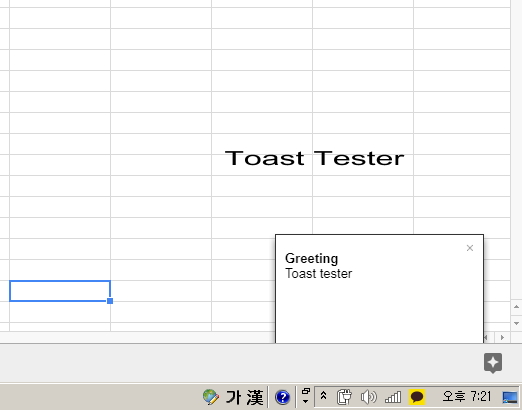
그림처럼 구글 스프레드 시트 오른쪽 하단에 토스트 메시지를 띄우는 코딩이다.
function greeting() { SpreadsheetApp.getActiveSpreadsheet().toast("Toast tester", "Greeting", -1); }
구글 시트에 메뉴 삽입 그림에서 텍스트를 입력한다.
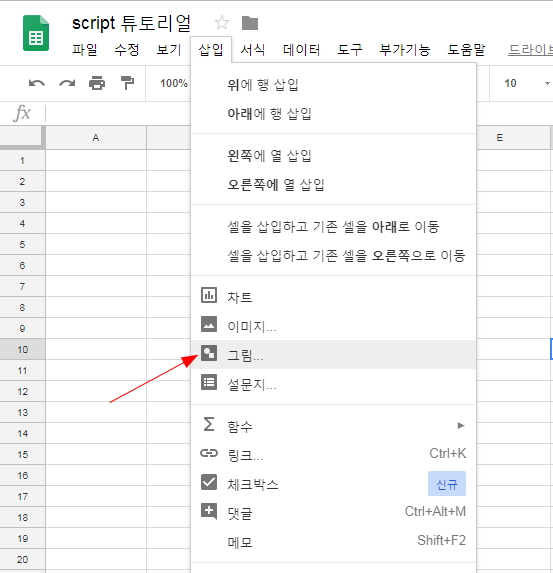
toast() 함수 매개변수 참조는 아래와 같다.
toast(msg, title, timeoutSeconds)
'구글 앱스 스크립트 튜토리얼' 카테고리의 다른 글
| 구글 앱스 스크립트(google apps script) for 반복문 예제 코딩 (0) | 2018.06.05 |
|---|---|
| 구글 앱스 스크립트(google apps script) GAS if else 문 예제 코딩 (0) | 2018.06.05 |
| 구글 앱스 스크립트 변수 선언 (0) | 2018.05.31 |
| 구글 앱스 스크립트(google apps script) GAS 시작하기 "Hello GAS" (0) | 2018.05.31 |
| 구글 앱스 스크립트란 무엇인가? (0) | 2018.05.31 |